- Dockerfile 89.2%
- Shell 10.8%
 ssa
2779121de4
ssa
2779121de4
Generated automatically with structured sections (overview, project structure, installation, usage, contributing, license, repository links). Original README content preserved under "Original README". |
||
|---|---|---|
| .github | ||
| root | ||
| .gitignore | ||
| .travis.yml | ||
| Dockerfile | ||
| Dockerfile.raspberry-pi | ||
| LICENSE | ||
| README.md | ||
docker-guacamole
Overview
A Docker Container for Apache Guacamole, a client-less remote desktop gateway. It supports standard protocols like VNC, RDP, and SSH over HTML5.
Detected project type: Docker.
This repository was migrated from upstream source github.com/shafiqalibhai/docker-guacamole and is preserved here for archival, reference, or continued local development.
At a glance
- Default branch:
master - Visibility: public
- Size: 91 KB
- Created: 2026-04-27
- Last updated: 2026-04-27
- Stars / Forks / Open issues: 0 / 0 / 0
- License: GPL-3.0
Languages
| Language | Bytes | Share |
|---|---|---|
| Dockerfile | 3,518 bytes | 89.2% |
| Shell | 427 bytes | 10.8% |
Repository structure
.github/root/.gitignore(7 B).travis.yml(1,531 B)Dockerfile(3,518 B)Dockerfile.raspberry-pi(3,505 B)LICENSE(35,148 B)README.md(4,268 B)
Getting started
Clone the repository:
git clone https://forgejo.deployview.com/ssa/docker-guacamole.git
cd docker-guacamole
Installation
docker build -t image-name .
docker run --rm -it image-name
# or with compose
docker compose up -d
Usage
After building, run the container with the command shown above. Mount volumes and forward ports as required by the application.
Original README
The content below is preserved from the previous README. Headings have been demoted so they don't compete with the new top-level sections.



Docker Guacamole
A Docker Container for Apache Guacamole, a client-less remote desktop gateway. It supports standard protocols like VNC, RDP, and SSH over HTML5.
This image will run on most platforms that support Docker including Docker for Mac, Docker for Windows, Synology DSM and Raspberry Pi 3 boards.
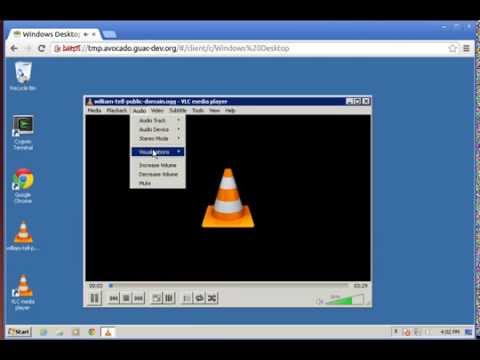
This container runs the guacamole web client, the guacd server and a postgres database.
Usage
docker run \
  -p 8080:8080 \
  -v </path/to/config>:/config \
  oznu/guacamole
Raspberry Pi / ARMv6
This image will also allow you to run Apache Guacamole on a Raspberry Pi or other Docker-enabled ARMv5/6/7/8 devices by using the armhf tag.
docker run \
  -p 8080:8080 \
  -v </path/to/config>:/config \
  oznu/guacamole:armhf
Parameters
The parameters are split into two halves, separated by a colon, the left hand side representing the host and the right the container side.
-p 8080:8080- Binds the service to port 8080 on the Docker host, required-v /config- The config and database location, required-e EXTENSIONS- See below for details.
Enabling Extensions
Extensions can be enabled using the -e EXTENSIONS variable. Multiple extensions can be enabled using a comma separated list without spaces.
For example:
docker run \
  -p 8080:8080 \
  -v </path/to/config>:/config \
  -e "EXTENSIONS=auth-ldap,auth-duo"
  oznu/guacamole
Currently the available extensions are:
- auth-ldap - LDAP Authentication
- auth-duo - Duo two-factor authentication
- auth-header - HTTP header authentication
- auth-cas - CAS Authentication
- auth-openid - OpenID Connect authentication
- auth-totp - TOTP two-factor authentication
- auth-quickconnect - Ad-hoc connections extension
You should only enable the extensions you require, if an extensions is not configured correctly in the guacamole.properties file it may prevent the system from loading. See the official documentation for more details.
Default User
The default username is guacadmin with password guacadmin.
Windows-based Docker Hosts
Mapped volumes behave differently when running Docker for Windows and you may encounter some issues with PostgreSQL file system permissions. To avoid these issues, and still retain your config between container upgrades and recreation, you can use the local volume driver, as shown in the docker-compose.yml example below. When using this setup be careful to gracefully stop the container or data may be lost.
version: "2"
services:
  guacamole:
    image: oznu/guacamole
    container_name: guacamole
    volumes:
      - postgres:/config
    ports:
      - 8080:8080
volumes:
  postgres:
    driver: local
License
Copyright (C) 2017-2020 oznu
This program is free software: you can redistribute it and/or modify it under the terms of the GNU General Public License as published by the Free Software Foundation, either version 3 of the License, or (at your option) any later version.
This program is distributed in the hope that it will be useful, but WITHOUT ANY WARRANTY; without even the implied warranty of MERCHANTABILITY or FITNESS FOR A PARTICULAR PURPOSE. See the GNU General Public License for more details.
Contributing
Contributions are welcome. The typical workflow is:
- Open an issue describing the change you'd like to make.
- Fork the repository (or create a feature branch if you have write access).
- Commit your changes with clear, descriptive messages.
- Open a pull request against the
masterbranch.
Please follow the existing code style and include tests or reproduction steps where relevant.
License
This project is licensed under the GPL-3.0 license. See the LICENSE file for the full text.
Repository
- Browse: https://forgejo.deployview.com/ssa/docker-guacamole
- Clone (HTTPS):
https://forgejo.deployview.com/ssa/docker-guacamole.git - Clone (SSH):
ssh://git@forgejo.deployview.com:30143/ssa/docker-guacamole.git - Upstream / origin: github.com/shafiqalibhai/docker-guacamole
This README was generated automatically based on repository metadata, contents, and any prior README content. Edit any section above to add project-specific detail.